Agentic chat is not the point; agency is. The step beyond “ask and answer” is a system that can plan, call tools, check its own work, and try again — a loop that looks less like a chatbot and more like a junior colleague. Build that loop and you inch closer to general capability.
What makes an AI workflow agentic?
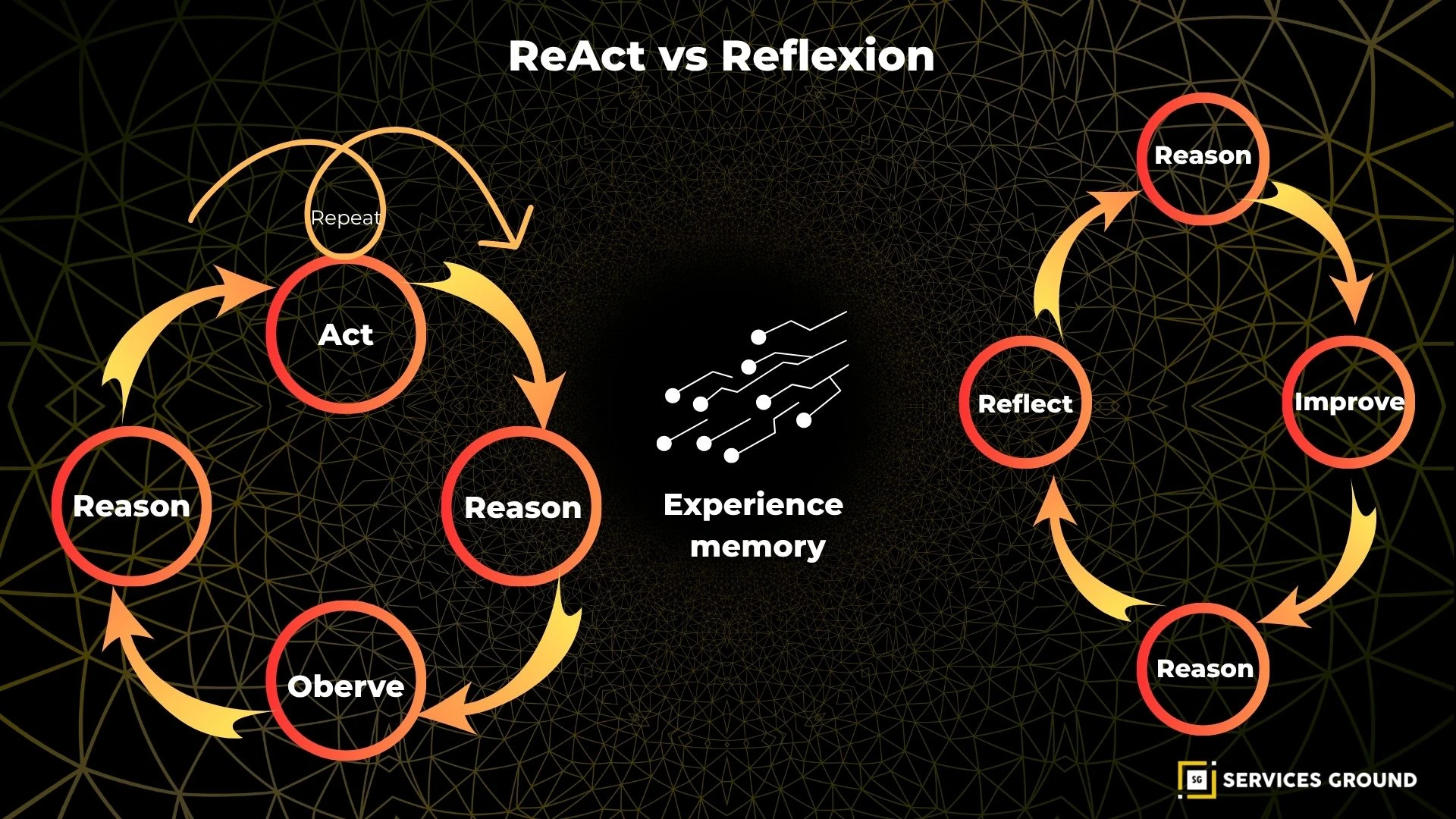
An AI workflow is agentic when it pursues a goal through iterative loops of planning, action, observation, and revision — not a single reply. The system can call external functions, keep working memory, critique its output, and decide the next step. This loop turns static chat into goal‑directed behavior.
In practice, that loop is built from a few primitives: explicit goals, a planner, tool calls, a critic, and memory. OpenAI’s function calling formalizes the “use a tool, then continue” pattern by letting models return structured tool invocations and arguments in-line with text, a foundation for actionable reasoning (OpenAI API docs).
Multi-agent orchestration frameworks add coordination. Microsoft Research’s AutoGen composes specialized agents that converse to solve tasks, mixing LLMs, tools, and human input; the team reports applications from math and coding to supply-chain optimization, showcasing collaborative problem solving (Microsoft Research AutoGen).
Why do agentic loops beat single-shot chat?
Agentic loops beat single prompts because they externalize thought: the system can plan, call tools, run code, inspect results, and revise. That makes long tasks tractable, reduces ungrounded guesses, and creates natural checkpoints for review — yielding higher reliability on complex work (AutoGen paper).
A chatbot that “answers once” cannot see its own mistakes. An agentic loop can route output through a critic, compare against constraints, and try alternates. This design encourages self-correction under feedback, the hallmark of skilled work in humans and machines alike (Microsoft Research AutoGen).
Tool use is decisive. With function calling, the model stops guessing about the outside world and requests a tool to fetch, calculate, or transact; the result then informs the next step, closing the perception–action loop (OpenAI function calling).
Chat-style LLM vs. agentic workflow — what changes?
How it works | Chat-style LLM (single shot) | Agentic workflow (iterative loop) |
|---|---|---|
Goal handling | Responds to a prompt as written; no persistence beyond a turn | Maintains an explicit goal and state across steps to finish the task |
Planning | Implicit in one message; brittle to prompt wording | Separates plan from steps; can replan when evidence contradicts |
Tool use | Limited or none; text-only reasoning | Structured function calls to code, APIs, or databases, then continues |
Error control | No self-check; user must notice issues | Built-in critique and retry, often via a dedicated critic agent |
Memory | Chat history only; prone to drift | External memory/notes to track facts, decisions, and constraints |
Oversight | All-or-nothing review at the end | Checkpointing enables review and branch/rollback during execution |
How do modern platforms implement agentic behaviors?
Most production stacks implement agency with five building blocks: function calling, multi-agent coordination, stateful memory, checkpointing, and human-in-the-loop. Together, these give you controlled autonomy: the model proposes, the system executes safely, and a reviewer can step in at clear decision gates.
OpenAI’s function-calling interface turns “please calculate X” into a typed tool request, arguments, and a response that the model can read and integrate before continuing — the backbone of reliable tool orchestration (OpenAI API guide).
On the orchestration side, Microsoft’s Agent Framework (evolving from AutoGen) bakes in patterns like agent-as-a-tool, group chats, and observability, plus checkpointing and resume. These enable auditable workflows that can pause, branch, and recover mid-task (Agent Framework guide).
For teams that want a visual layer, AutoGen Studio shows multi-agent runs with metrics like message counts, token costs, and timings; that makes it easier to debug loops and tame spend while scaling long-running tasks (AutoGen Studio paper, 2024).
What risks emerge as agents gain autonomy?
Agency widens the attack surface: agents can be baited by prompts, miscall tools, or exfiltrate data through responses. The OWASP Top 10 for LLM Applications catalogs risks like prompt injection, unauthorized actions, data leakage, and overreliance — a menu of real failure modes (OWASP LLM Top 10 PDF).
Practically, you need boundaries. Use allow-listed tools, typed arguments, and strict schema validation on tool outputs. Fence sensitive actions behind approvals or rate limits. These patterns convert “try anything” loops into bounded autonomy (OWASP v1.1 update).
Observability is as vital as control. Capture prompts, tool calls, returns, and critic notes with redaction where required. Microsoft’s guidance around checkpointing and resuming gives you the primitives for postmortems and rollbacks in real deployments (Agent Framework migration).
How do agentic workflows move us toward AGI?
Agentic workflows do not conjure general intelligence, but they operationalize elements of it: sustained goals, tool use, self-critique, and learning from outcomes. Each loop that can plan, act, and revise across tools is a small scaffold that supports generalizable competence (AutoGen research).
Autonomy reveals gaps models must close. When an agent plans and hits a wall, we see needs for better memory, hierarchy, and transfer. Those gaps motivate research and product cycles, while shipping useful systems today — a pragmatic path to broader capability (AutoGen paper).
Tool grounding speeds that path. Function calling routes reasoning through verified code and data, shrinking hallucination surface and forcing the model to explain next steps. You get value now, and a training signal for stronger decision policies tomorrow (OpenAI function calling).
How should you pilot an agentic workflow in your org?
Start narrow and measurable: one task that benefits from plan–act–check cycles, has safe tools to call, and a human who can review checkpoints. Ship a loop in weeks, not quarters, then iterate on failures you can see. That’s how you turn proof-of-concept into production lift (AutoGen Studio).
Choose a workflow with friction. Look for research-heavy tickets, compliance checks, or data pulls where agents can reduce rework and wait time.
Define the loop explicitly. Write the goal, plan template, tool list, critic rules, and stop conditions; the model then has scaffolding for decisions.
Gate the risky steps. Require approval for high-impact tools, add rate limits, and instrument logs; align this with OWASP LLM risk classes.
Implement tool calls first. Get structured inputs/outputs working with strict schemas; only then add multi-agent handoffs.
Add checkpointing and tests. Run with synthetic cases and golden sets so you can replay failures and verify fixes.
Track cost, latency, and quality. Use per-run dashboards and a weekly review; AutoGen Studio’s metrics are a model for operational visibility.
What does a maturity path for agents look like?
Teams progress from scripted helpers to semi-autonomous operators in three stages: prototype, pilot, and production. Each stage adds guardrails, memory, and review discipline. The goal is not more prompts but more control points and observability, so autonomy increases without surprises or unsafe actions (Agent Framework guide).
Stage | How it works | Safety guardrails | Metrics that matter | Human role |
|---|---|---|---|---|
Prototype | A single agent executes a short plan with 1–2 tools and no persistent state; outputs are reviewed after each run to catch errors before any commit | Low-risk tools only; manual approval before any external call; strict schema validation on tool outputs | First-pass success rate; defect types per run; tokens per task to spot obvious waste | Reviewer signs off on each step and blocks unsafe actions |
Pilot | The loop adds typed function calls, a critic pass, and checkpointing so runs can pause and resume cleanly; a small memory stores facts and constraints across steps | Allow-listed tools with typed arguments; rate limits; auto-redaction for sensitive data; gated high-impact actions | Retries per task; human override rate; quality deltas after critic; effective cost per accepted deliverable | Approver at risky checkpoints; resolves critic–actor disagreements |
Production | Multiple specialized agents coordinate with shared state and full audit logs; failures can branch and roll back; sandboxes isolate effects of tool calls | Runtime policy enforcement; secrets vault; end-to-end observability; simulators for dry runs before live execution | SLA latency; pass rate against golden sets; incident count and MTTR; spend vs. saved labor | Exception handler for edge cases; owner of postmortems and continuous tuning |
A practical example is a compliance briefing agent. It plans sources, calls a research API, writes a draft, routes it through a policy critic, and pauses for approval before sending. Checkpoints and typed tools, as described in Microsoft’s Agent Framework guidance, make that flow auditable and safe (migration guide).
Frequently Asked Questions
Do I need multiple agents, or can one agent suffice?
One agent with a planner, tools, a critic, and memory often wins against none; multiple agents help when roles are distinct or you want deliberate disagreement before a final merge (Microsoft AutoGen).
How do I measure success beyond “it seems smarter”?
Instrument the loop. Track first-pass success, retries per task, human overrides, and defect types. Use checkpoints to tag failure causes and replay runs — the same moves that power A/B learning cycles in software (Agent Framework guide).
Won’t agents balloon cost and latency?
Loops add calls, but tool grounding cuts wasted tokens, and critics prevent expensive failures. Visual profilers like AutoGen Studio reveal where tokens and time go, so you can prune nonproductive steps without losing quality (AutoGen Studio paper).
The promise is not a sci-fi leap; it’s steadier: design loops that plan, act, and learn under guardrails. Do that and you move past chat toward systems that build, fix, and decide — the work that looks like intelligence in action.

No comments yet. Be the first to share your thoughts!